
Track three different things
A spell can have a duration without requiring concentration. A concentration save can be due while time remains. Treat the effect, its clock, and a pending save as separate pieces of information.
Under SRD 5.2.1, damage calls for a Constitution save with DC equal to the higher of 10 or half the damage, rounded down, capped at 30. The 2014 rule has no stated DC 30 cap. NAT420 defaults to the 2024 calculation; its explicit 2014 override affects future prompts.
Mira’s ward
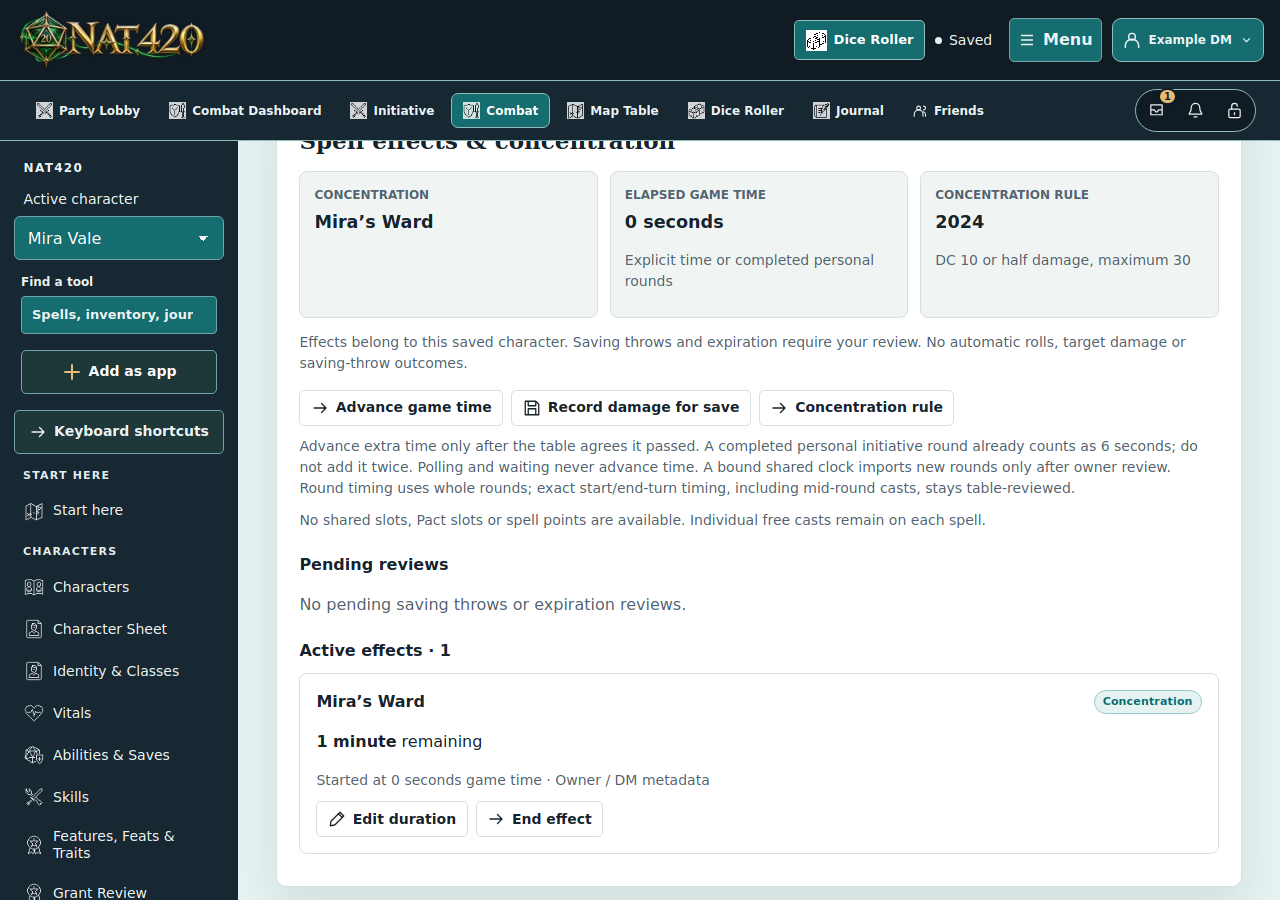
Mira confirms a concentration spell with a one-minute duration. Later, 14 damage gives her a DC 10 concentration prompt. Resolving that save does not itself advance the game clock. This example uses a fictional spell label so it does not imply a particular spell’s targeting or resource rules.
Confirm the effect you mean to track
- Choose your character and open Spells. Check the spell’s duration and concentration metadata; custom or imported spells may need correction.
- Choose Cast. Review the spell, resource cost, and tracking details before confirming. A preview does not consume resources. If a roll-visibility chooser appears, confirm the intended audience to finish the cast.
- If another concentration effect is active, review and explicitly confirm replacing it. Starting another concentration effect ends the previous one under both editions.
- Open Personal Combat and find Spell effects & concentration. Check the active effect and remaining time. An unknown duration needs a deliberate override, not a guess based on its name.
Advance game time, then review prompts
Waiting with the browser open does not spend spell time. Completed personal combat rounds advance the clock; you can also review an explicit game-time change. Enter elapsed time only once. Going to a previous turn is not a time rewind.
When damage produces a concentration prompt, make the required save using your table’s rules, then record the outcome. If you need to check the roll procedure, review advantage, disadvantage and modifiers; a concentration prompt does not itself grant advantage. NAT420 does not decide success for you. A failed save requires your explicit resolution to end concentration. Review other ending conditions, such as incapacitation, with your table too.
When the duration reaches zero, the effect becomes due for review. Confirm that it ends, or apply a justified correction. The tracker does not silently remove it. In a shared fight, bind your character to the shared clock and use Review shared time & damage in its Combat Dashboard; do not also advance a duplicate personal clock.
Rules references
- SRD 5.2.1, Rules Glossary: Concentration (printed page 179)
- 2014 Basic Rules: Spellcasting, Concentration
Use the rules edition agreed by your group. See Sources & attribution for NAT420’s SRD credits.