
1. Give the session record, preparation, and handout separate homes
Your notes should let you answer three questions quickly: what happened, what the party knows, and what needs attention next. Use the DM Session Prep Checklist to plan the meeting, then keep its decisions in the records below. Avoid making a second full copy of every NPC or quest inside every session note.
| Record | Keep here | Reader |
|---|---|---|
| Sessions | Meeting title/date, status, linked table, actual times if known, decisions, outcomes, and unresolved questions. | The owning DM. |
| Private Notes | Secrets, unused scenes, loose ideas, and the next preparation list. Associate a note with a session when useful. | The owning DM. |
| NPCs and Quests | The current recurring person or objective, with concise references from the session record. | The owning DM, unless separately reviewed text is published through another tool. |
| Session Recaps / Player Knowledge | A deliberately reviewed summary or focused handout for selected current players. | Only the recipients admitted by that publication’s current access checks. |
| Character Journal | A player’s own character perspective. | Managed separately from the DM’s campaign records. |
In the Reedcross example, the session record says the party restored the signal and delivered the medicine. Sella’s NPC record holds her continuing boat promise. The unsolved lens theft belongs in its ongoing quest, with hidden motives kept in private preparation.
2. Create the campaign and a useful session record
- Enable Dungeon Master controls in Settings, then open Campaign Dashboard. Create or select Lanterns of Reedcross. Its Summary should explain the current situation in a few sentences.
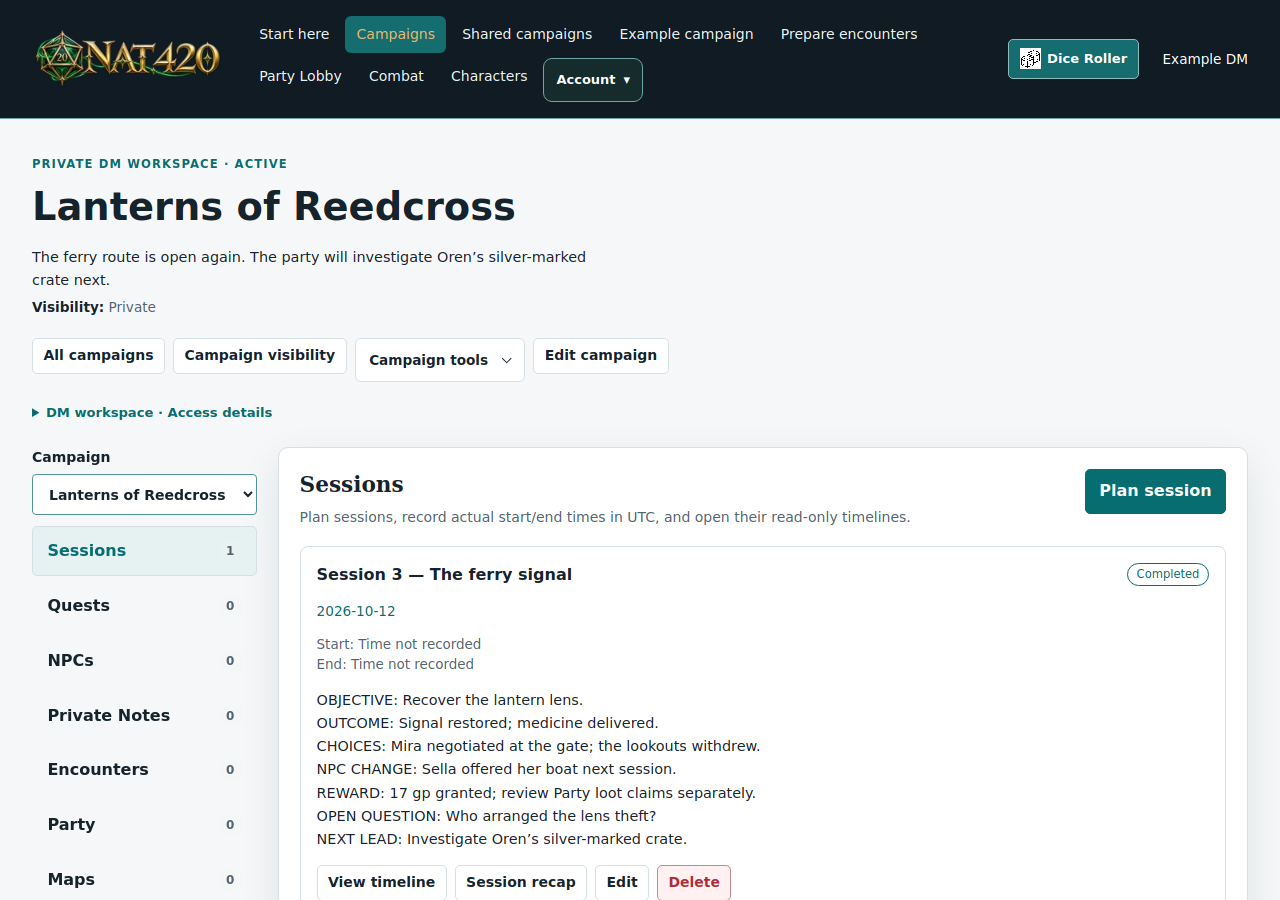
- In Sessions, choose a clear title such as Session 3 — The ferry signal, set the planned date, and choose the appropriate status. Select the linked party table if this session uses one.
- Paste the template below into Session notes. Fill the preparation headings first; add outcomes during pauses and after play. Save and check the confirmed result before leaving.
- Use optional actual start/end times only when you know them. The editor’s Start now and End now buttons update the draft; Save session commits them. These fields use UTC. A planned calendar date is not an actual start time.
- Keep detailed secrets and the next preparation list in Private Notes. Use a searchable title and, when useful, its session association. On a phone, the Section selector switches areas; Campaign tools opens related workspaces.
Do not invent precise times after the fact. Correcting a session’s manual time window can change which source events appear in a filtered timeline, but it does not rewrite their original timestamps.
3. A complete session-notes template
Copy this into Session notes and replace the prompts. The whole record is private DM material; the recap draft near the end is still private until you review and publish it separately. Leave a field blank or mark it “unknown” when you did not record it.
CAMPAIGN:
SESSION NUMBER / TITLE:
PLANNED DATE:
ATTENDEES / ABSENCES:
LINKED PARTY TABLE:
ACTUAL START / END (UTC, if known):
RULES OR TABLE AGREEMENTS RELEVANT TONIGHT:

BEFORE PLAY
Objective:
Opening situation:
Two or three decisions the party can make:
Consequences if nobody intervenes:
NPCs to have ready (name + want + useful fact):
Quest objectives / clues in play:
Prepared encounter / map references:
Visible terrain and any rulings to explain:
Current HP / resources / ongoing effects to confirm:
Private secrets and unused material (reference, not a duplicate):

DURING PLAY
Events in order (short factual lines):
Player choices and promises:
Established facts:
Party theories / unconfirmed claims:
NPC changes (name + disposition / relationship / promise):
Quest progress (title + objective result):
Combat / condition / timing corrections and reason:
Rewards actually granted (amount/item + recipient + claim status):
Pending saves, effects, reconciliation, or disputed results:

AFTER PLAY
What changed in the campaign:
Unresolved questions:
Chosen next lead:
Player-facing recap draft (facts the party actually knows):
Information to keep private:
Session / NPC / quest records to update:
Confirmed saved state / outstanding recovery check:

THREE PREPARATION TASKS
1.
2.
3.
Keep the event log short enough to scan during a session. Distinguish “the party thinks Pell ordered the theft” from “Pell ordered the theft.” The first is a recorded theory; the second belongs in private preparation until established in play.
4. An example campaign record after the session
Lanterns of Reedcross — session three
Campaign Summary: Reedcross’s ferry route is open again, but the missing lantern lens has exposed a dispute over the marsh cargo. The party will investigate the silver-marked crate next.
Session: Session 3 — The ferry signal; date 12 October 2026; status completed; linked table Reedcross party. Actual times are left blank because they were not recorded.
Session notes: Mira negotiated with the lookout at the gate. The party recovered the lens and restored the signal. Oren took the medicine aboard. Sella promised the use of her boat. The party saw a silver mark on Oren’s crate but did not establish who arranged the theft.
Private Note: Reedcross — next session. Prepare Oren’s account of the crate; keep Pell’s undiscovered involvement here; outline a marsh route and a ferry route. Do not place that secret in the player recap.
| Record | Current entry | Next action |
|---|---|---|
| NPC: Keeper Sella | Friendly; wants medicine delivered; knows the marsh route; owes the party one use of her boat. | Prepare her response if the party asks for help reaching the workshop. |
| NPC: Courier Oren | Wants the cargo protected; the party saw his silver-marked crate. Separate what he has admitted from his private secrets. | Write the useful fact he can reveal and the cost of his cooperation. |
| Quest: Deliver the medicine | Objective achieved; mark completed after reviewing its recorded progress. Reward recorded: 17 gp granted by the DM. | Check the actual loot reservation/claim status separately; the quest record does not pay it. |
| Quest: Find who moved the lens | Open lead; party theory concerns the crate. The culprit is not a player-established fact. | Prepare one clue for each route the party might choose. |
These are example values to enter, not records NAT420 creates automatically. Use the combat walkthrough’s wrap-up when the session includes a fight, and keep narrative rewards distinct from confirmed item or coin movements.
5. Connect NPCs and quests without duplicating their text
NPC Relationships link another NPC in the campaign or an available character in its linked tables. The relationship label describes the connection; it does not invite that person, publish a secret, or grant sheet access. An NPC’s relationship picker is not a general quest-linking field.
- Save Sella and Oren as NPC records. Add a relationship between them labeled “arranges medicine deliveries.” Keep each NPC’s own motives and secrets on its own record.
- In the medicine quest, record the objective and a concise note naming Sella as the contact and Oren as the courier. Record discoveries and reward status there instead of maintaining a second quest history in an NPC biography.
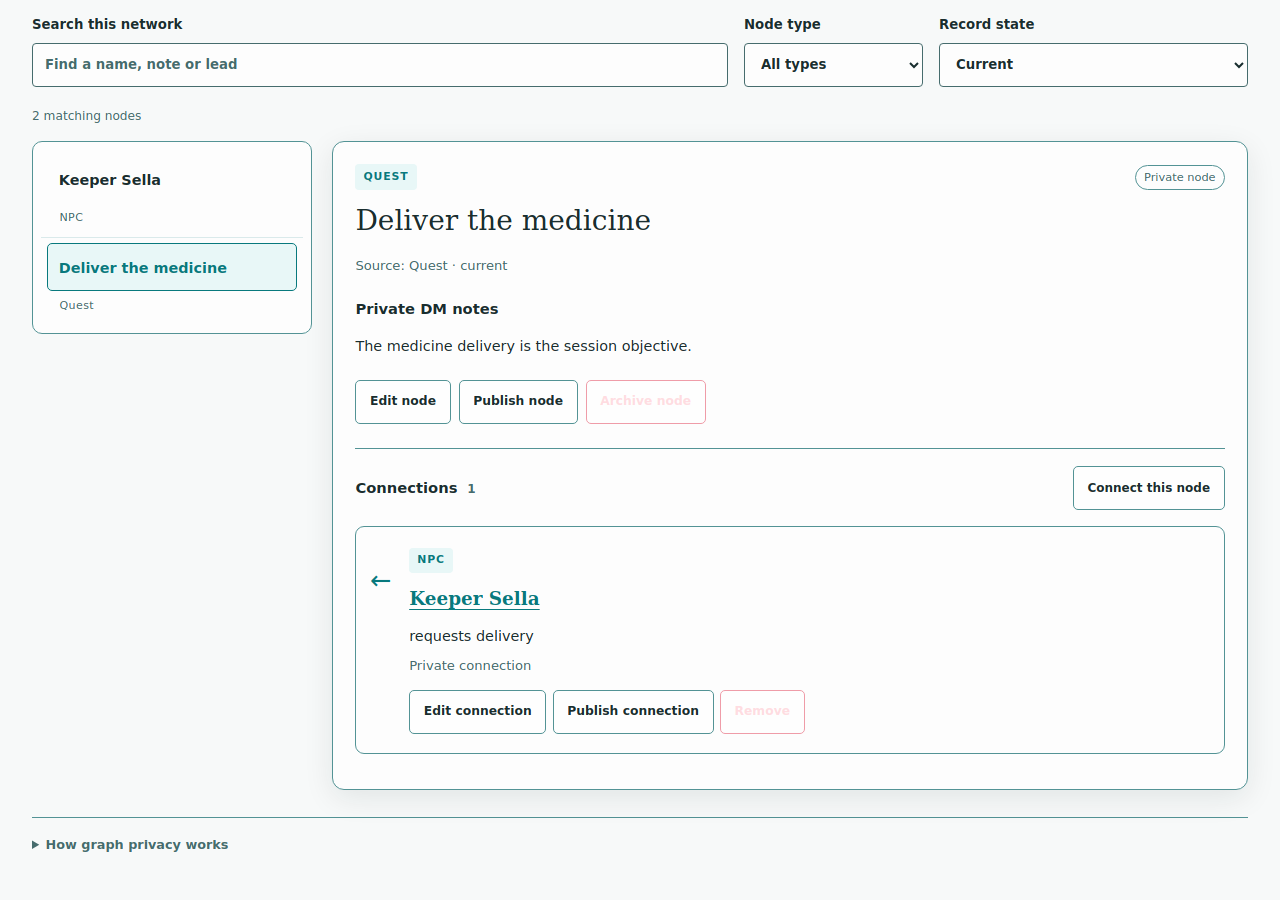
- For a visual NPC-to-quest connection, open Campaign Graph. Create nodes from the saved NPC and quest sources, then add a labeled edge, such as “requests delivery.” A source-backed node uses the saved record’s label; private graph notes can hold your interpretation.
- Review what each edge means. “Suspected employer” is a theory, not the same fact as “employer.” Replace or annotate the label when play establishes the answer.
Campaign Graph is private by default. Private graph notes and tags are excluded from node publication. Sharing a node uses an existing published Player Knowledge edition, or an eligible current party character name; connection labels and notes have their own explicit publication choices. Both endpoint editions must be visible to the selected players. Do not assume that publishing an NPC handout also publishes the connected quest, neighboring nodes, or underlying source text.
6. Separate DM knowledge from player-facing information
| Information | Private DM record | Suitable player summary |
|---|---|---|
| The lantern theft | Pell ordered the lens moved; the party has not discovered his involvement. | “The lens was recovered. Who arranged its removal is still unknown.” |
| Oren’s crate | Its full contents and the clue you plan to reveal next. | “The party saw a silver mark on Oren’s crate and chose to investigate.” |
| Sella’s promise | Her motives, limits, and response to pressure. | “Sella offered the party use of her boat next session.” |
| Reward | What the DM granted and any outstanding movement/recovery check. | The confirmed reward and the group’s agreed split; do not claim an unaccepted reservation is already on a sheet. |
Campaign Summary, Sessions, Private Notes, NPCs, and Quests remain in the owning DM’s workspace. Linking a party table does not publish them. Labels such as party known are bookkeeping, not a sharing action.
For a campaign overview, open Campaign Dashboard → Campaign visibility. This button appears on every owned campaign card and in the open campaign’s header, alongside its saved audience. Choose Private, Friends, Specific friends or Public. Specific friends lets you check current accepted friends; only those selected can open the shared view. Public is available only when the campaign and all linked content use SRD and original homebrew. Enter a separate player-facing summary and select NPC descriptions or quest party-known summaries. The shared view is read-only; DM notes, NPC secrets, relationships, maps and full sheets are excluded. Selected fields update with source edits. Public campaigns may contain only SRD and original homebrew material, including linked characters, encounters and maps. Adding restricted content suspends the public view. New imported campaigns start private.
Shared campaigns includes Public campaigns automatically. For a complete starting point, explore Torrii Between Tides directly: prepared characters, six encounters, NPCs, quests, a map and session notes. Read its original fictional preparation without signing in or importing. DMs also see public entries below their owned campaign list. Follow Preview → Copy → Prepare: choose Make a private copy, review and confirm the import, then open your copy to review the first session and encounter before inviting players; a shared view grants no editing or table authority.
Use Player Knowledge for a focused handout and Session Recaps for the meeting’s summary. Read the exact text and named recipients in their publication review. Manually entered text can contain secrets even when the selected source is player-eligible.
7. A sample recap, then the publication review
Recap draft: The ferry sailed at dusk
The party recovered Reedcross’s lantern lens and restored the signal in time for the medicine ferry. Mira’s negotiation at the gate gave the lookouts a way to withdraw, and Oren took the shipment aboard.
Sella offered the party use of her boat for the next journey. The DM granted 17 gold pieces; the group agreed to review the split through Party loot. Check the chest and your reservation before treating that payment as received.
A silver mark on Oren’s crate remains unexplained. The party chose to follow that lead toward the lantern workshop next session. Who arranged the lens theft is still unknown.
- Open Session Recaps, choose the campaign and session, and select the eligible material you want to use. Generate or edit the recap, then save a draft.
- Compare the draft with the session record. Keep established facts, deliberate promises, and the chosen next lead. Remove private motives, hidden map information, and unanswered mysteries presented as facts.
- Review publication. A currently available open linked party supplies eligible current player recipients. Inspect the exact title, text, selected provenance, and recipient names before confirming.
- Publish deliberately, then check the displayed result. Publication creates no public article or automatic email/push announcement. New or rejoined members, or changed source/session context, can require a fresh review.
If the reviewed source or access changes, a publication may be suspended rather than silently updated. Regenerate or edit a current draft and review it again. Do not paste your whole private template into the recap merely to fill an empty section.
8. Close with three specific preparation tasks
After checking the saves, update the session status and recurring NPC/quest records so they agree. Leave three tasks that name the record and the decision needed; “prepare more story” is too vague to act on.
Reedcross — next session
- Update Oren’s NPC record: prepare what he admits about the silver mark and what he wants in return.
- Outline two routes in Private Notes: the marsh path and the ferry approach to the workshop; prepare a map only if positioning will matter.
- Check the recap and reward claims: confirm which lead the players intend to follow and any continuing conditions before planning the next challenge.
Return to the DM Session Prep Checklist’s next-session stage. It is the hub for attendance, encounter preparation, party setup, play, and follow-up; this template supplies the record you carry between those stages.